
6 Steps to Creating Long-form Content for Social Media Sites
If you’re a marketer, it’s obvious that one of your biggest worries is lead generation. You’re always looking for new ways to capture more leads for your business. And you’re not alone.
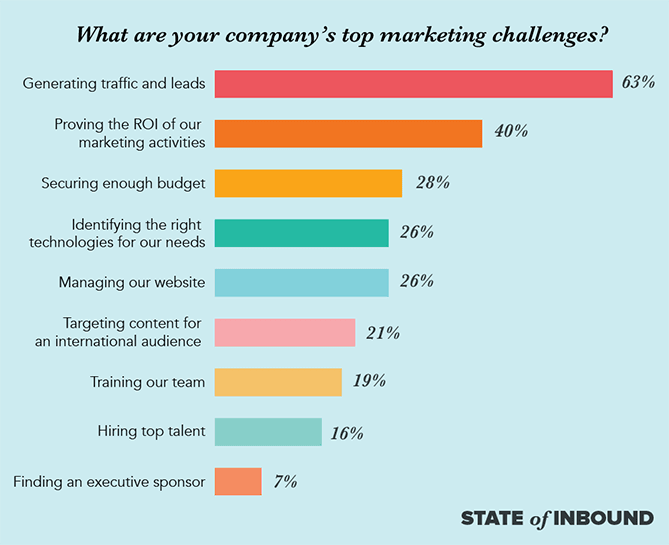
According to State of Inbound report, generating traffic and leads is by far companies’ top marketing challenge.
But often times, it’s difficult to get leads that will ultimately become your customers. But what if you can tap into the power of social media content marketing to acquire more targeted traffic and leads to your website?
That’s exactly what long-form content on social media will do for your business. There is a big audience on social media. There are about 2.46 billion monthly active users on social media with that expected to reach 2.62 billion by the end of 2018.
However, it’s difficult to stand out amidst the noise on social media. One way you can stand out is through long-form content. Now there is lots of debate in the SEO world on how long should a blog post be but for this article we are going to focus on getting more external content on social media, to point back to your blog pages.
Benefits of long-form content on social media.
There are many advantages of publishing long-form content on social media. Let’s consider a few of them:
- You can analyze a complex concept easily.
- Users don’t need to go to your website before they access this content.
- Your content can be found on search engines. According to several studies, search results on Google’s first page are usually 2,000 words or more.
- You build your reputation as an expert in your industry.
- It is an opportunity to capture more leads.
There are simple steps you can follow on dedicated social media portals to give you the best chance of capturing leads for your business. We’ll consider these 6 steps:
i). Define your social media goals: What do you want to achieve with your content on social media? In this case, you’re trying to capture more leads. But you have to engage your readers and provide value to achieve it.
ii). Decide whether it’ll be gated or non-gated: This is where you decide how you want to capture leads. Do you want more reach for your content or are you willing to sacrifice reach for leads?
Gated content is content that requires readers to submit their information like name, company, email address, etc. before they can access your content. The objective is to capture leads before you get the value in the post. Here is an example of what I mean…
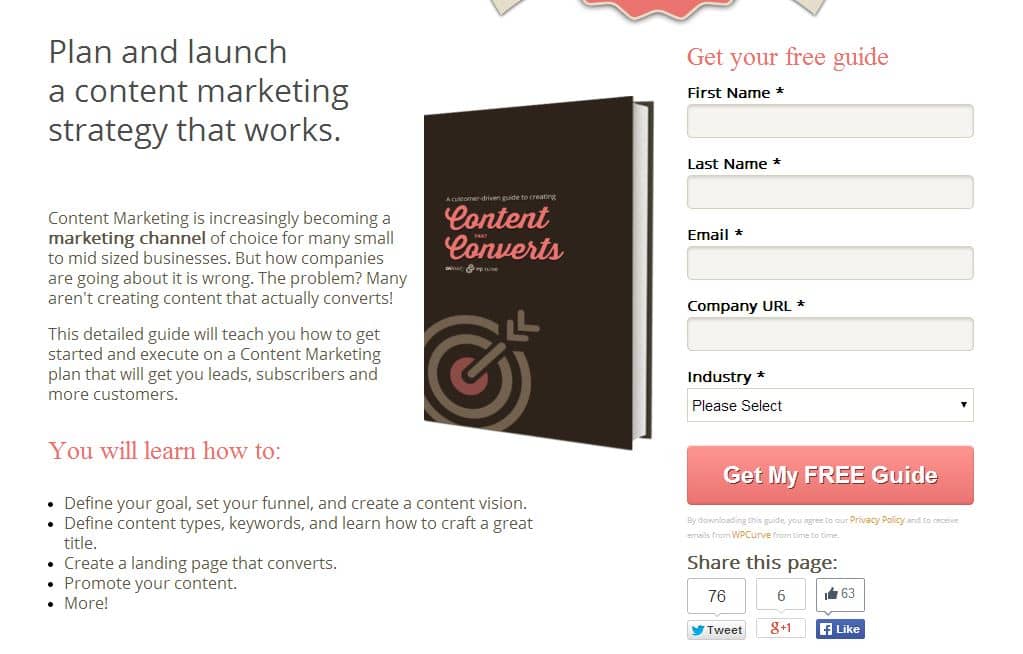
Another way is that you can leave the access open for every reader. This gives your post more reach. You can have a link to subscribe later in the post to capture leads. Most people bounce off a page if they have to submit their information which means gated content may have a lower reach.
iii). Define value for your audience: People see value differently. Some people require little to derive value from your content while others require a lot before they’re satisfied.
What is value to your audience? You can check the long-form content that has performed well in your industry in the past to get a clue of what is expected of you to provide value.
iv). Perform keyword research: What do you want to write about? What are the words your readers use when they talk about this topic or when they go on search engines?
Let your keyword research guide you in writing a new topic or writing an old topic with a new insight.
v). Write your post: Now you have to write which is probably the most important step as you have no content without this. If you want to capture leads, you need quality content for this.
You can either write the post yourself or get a great writer to write for you to connect with your readers.
One other thing you also have to add to your content is visuals. After all, articles with images get 94% more views than those without.
vi). Optimize for conversions and promote your content: In your content, you should always insinuate to your readers that they can get more benefits when they submit their information to you.
You have to promote your content to give it as much exposure as possible.
Let’s consider how you can implement these steps in the following social media channels.
The Rise of Social Media Content Marketing – Navigation Links
Long-form Content for LinkedIn
Long-form Content for Facebook
Posts for Google My Business
Long-form Content for Medium
Business Q & A for Alignable
How to create long-form content for LinkedIn (Posts, Formually Pulse.)
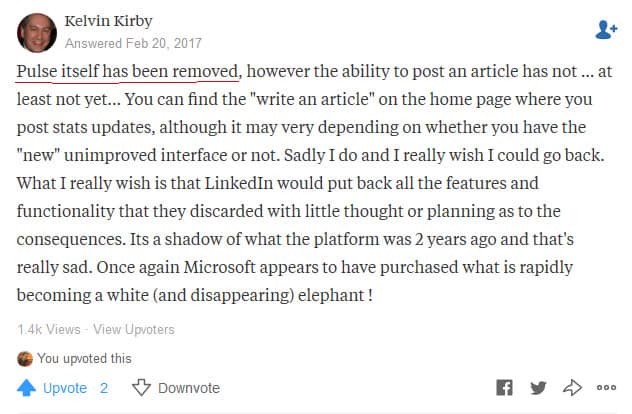
You can create long-form content on LinkedIn majorly through the new LinkedIn Posts feature (Pulse has gone away). The shift from “pulse to posts” happened sometime in the last two years after Microsoft purchased Linkedin in 2016.
If you do posts on LinkedIn consistently and implement the right strategies, you can easily drive traffic and leads to your business by publishing on LinkedIn with Posts.
Here’s how you can go about this.
- Keyword Research for LinkedIn
What are the terms people use when describing the topic? Content on LinkedIn usually has a professional tone and those are the words you must look for when looking for keywords.
For your post on LinkedIn, the headline is very important. According to research by Noah Kagan and Search Wilderness, they found that How-to articles and listicles perform best on LinkedIn as they got average views of 22,368 and 16,364 respectively.
This is a How-to post by Richard Branson that has over 1 million views and over 15,000 likes

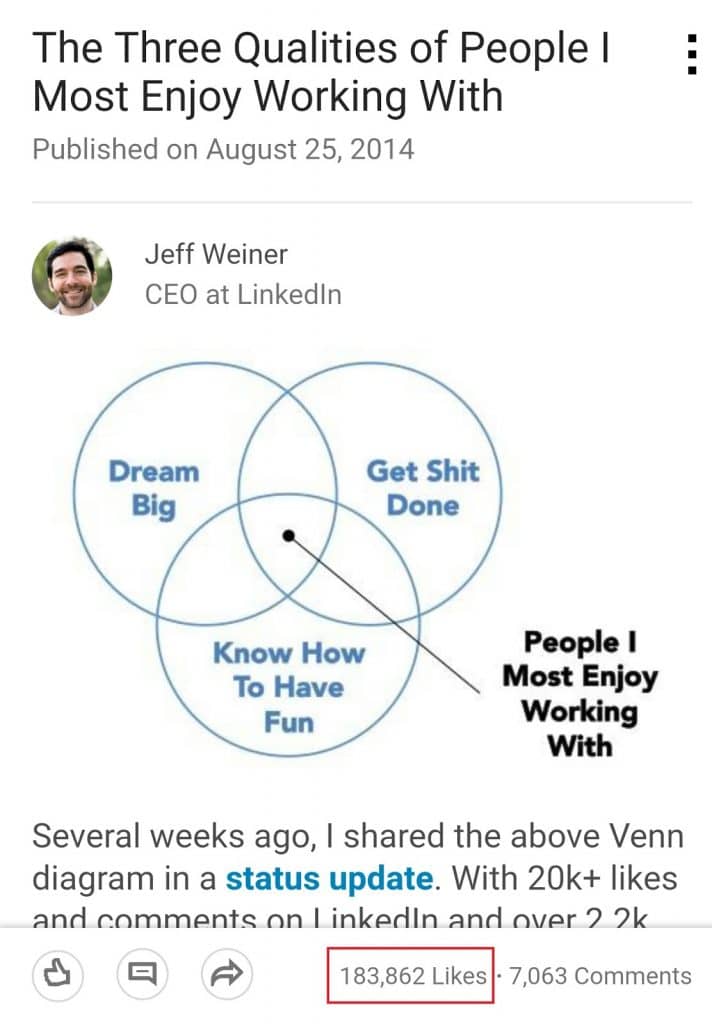
This is a listicle by LinkedIn CEO, Jeff Weiner, that has over 180,000 likes, we can’t all be the CEO of LinkedIn but what we are saying here is always swing for the fences.
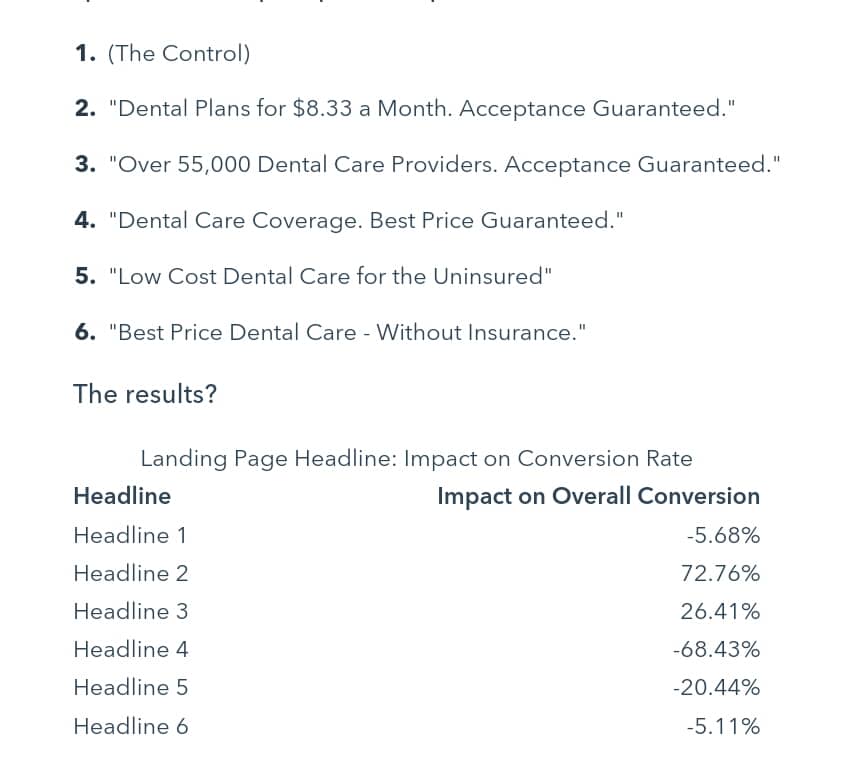
Include a number in your headline as they tend to perform better. Tests conducted by Marketing Experiments for an online dental company found that headlines with number increased conversion.
They compared headlines and their result is shown below.
To post on LinkedIn, check the popular posts to know what works for this type of audience. You can also use amazing tools to perfect your headline like co-schedules headline analyzer or BuzzSumo for content question topics.
1). Write your post for LinkedIn
To write your post, simply sign in and click ‘Write an Article’ in your usual message posting section of your LinkedIn profile.

After this, you’re transferred to the LinkedIn Post editor where you can see a new blank post ready for your input.
You can craft your post now. Add pictures to your post. According to Kagan, posts with images have a greater number of LinkedIn shares, likes, comments, and views. After this, you can publish your post.
2). Optimize for conversions on LinkedIn Pulse
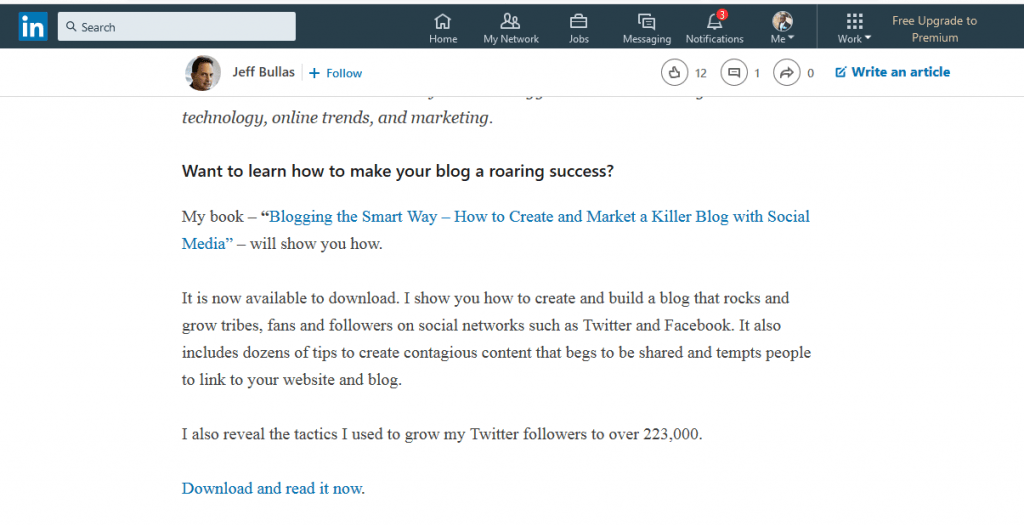
To optimize your post for conversion, you can offer an ebook or any freebie that will attract your readers to give you an opportunity to capture leads.
Jeff Bullas in a LinkedIn post offered a resource at the end of the post to capture leads.
The link leads you to